Experiences with the use of IT in teaching.
Cheryl Pope, Department of Computer Science The University of Adelaide
Experiences with the use of IT in teaching.
Background
During 1996-1997, the department of Computer Science began increasing the use of IT for providing course information. Although IT has been used extensively by the department in support of teaching (electronic handin of assignments, e-mail, student practical work) this marked a change towards provision rather than collection of information. Nearly all courses within the department have associated web pages (most for the first time this semester), developed and maintained by the lecturers. In addition, the Faculty of Engineering also produced a CD-ROM containing software, course notes, and faculty web pages. The CD-ROM was distributed to all first and second year students requesting one.
Given that the web pages (and to a lesser extent the CD-ROM) were the creation of individual lecturers with different experiences and background, the web pages vary from subject to subject and include many ideas on how to make use of the web to support students’ learning. After having the web pages and the CD-ROM available for a semester, I believed it was time to gather feedback from both the students and staff on their experiences, both positive and negative, to provide some guidelines on how to get the best benefits for both students and staff using the technology.
Method
Staff were surveyed individually. All staff who had developed a web page or taught a course which had an associated web page gave responses. I did not limit discussion to particular questions. I asked staff to comment on what had worked, what had not worked and why. I also asked for issues or concerns that the staff members had regarding the use of the web and CD-ROM and for any feedback they had received directly from students.
Students completed an on-line (web based) survey form (see Attachment). Lecturers notified students of the survey during lectures and a notice was sent by e-mail to all students. Responses sent via the web survey form were anonymous. I also informed students that they could send me e-mail or see me directly if they did not want to use the web survey form. The questions asked were aimed to help determine what students found most useful in their studies, to identify any problems and to find ways of extending the web pages and CD-ROM to make them more useful to the students’ studies.
Results
The following pages summarize the results of the survey and the comments given by both students and staff. Suggestions and guidelines of general use to those considering providing web pages or CD-ROMs for courses as well as specific suggestions relevant to the department of Computer Science’s courses are included.
Web/CD ROM use survey
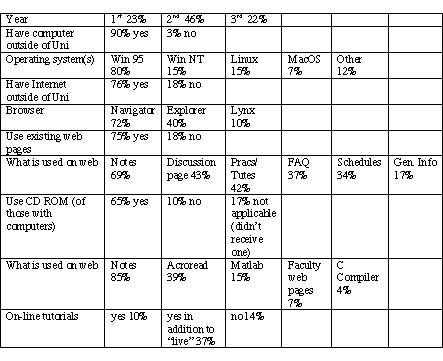
Number of respondents: 79
(note all respondents did not respond to all questions so percentages may not sum to 100%.)
CS web pages used by survey respondents: Programming Techniques, Computer Science 1, Computer Systems, Computer Networks, Artificial Intelligence, Data Structures and Algorithms, Engineering Programming 1E, Compiler Construction
Comments from students and staff are summarised below.
Course web pages
Providing course web pages has, in general, been useful for both staff and students. Students appreciate having the material available, which gives them a structure for note taking and allows them more flexible access to course materials. Staff report reduced time spent providing extra copies of course material to students who have missed or lost handouts and also answering common questions. Students were particularly complementary of the Programming Techniques (PT) web pages, which can serve as a model.
The web pages are primarily used for accessing course materials; but a significant proportion of students (over 40%) are making use of discussion pages and frequently asked question pages. Some students suggested making the material complete so students could do the course externally. This is a longer-term issue as to whether the department/university allows this. At present the material is not presented as complete. Most students do not want to lose the face to face contact (see survey on on-line tutorials); but this may be an option for part-time students who are highly self-motivated. Again it is important to explain to students the role that the web pages play in their studies. First year students in particular need guidance on how to effectively use the course web pages.
Providing lecture slides
Some lecturers note that this can reduce lecture attendance to the detriment of students’ learning. Others find that it aids the students’ note taking. It is important to emphasise to students that the notes do not act as a substitute for lectures, if that is the intent. One student commented that lectures merely went over slides (which could be done on own with textbook) so the lectures were not of great benefit. On the other hand another student commented that the web pages weren’t particularly needed as the material was covered in lecture. This is indicative of different study approaches of students.
It is worth researching the effect of giving copies of slides to students should an opportunity to do so arise. The evidence gathered so far is anecdotal and differs from lecturer to lecturer. Until proper evaluation is done, I recommend that this be left up to the individual lecturer to decide whether copies of slides should be provided or not based on experienced effects, rather than forming a departmental policy that they will (or will not) be provided.
The standard format of slide files is currently HTML for viewing/web and Adobe PDF for printing/CD ROM. This is for two main reasons: HTML browsers are available for free for all computer platforms. Acrobat Reader (which views PDF files) is a reliable viewer available for free on all computer platforms. This free, cross-platform availability is not the case with most other formats. Also PDF allows control of printing and access (by password) if needed. Acrobat writer licenses for staff are available through Nick Falkner.
Students prefer PowerPoint/word format so that they can edit slides and copy them into their own notes and control printing (number of slides/page). I am currently exploring copyright/intellectual property issues with this.
Bulletin Boards/Discussion Boards
Students tend not to use the bulletin boards to ask questions if the option of e-mailing to the lecturer directly is available. Since students do use the bulletin boards to read answers and e-mailing the board is no harder than e-mailing the lecturer, I conclude that the problem may be lack of anonymity. This may be addressed by stripping student name/e-mail from the hypermail archives (I will investigate). In addition, if questions are not answered, students will quickly stop using the board. Defining the "turn around time" for answers can help (within 2 days, within 1 week, etc). If you are unable to respond to questions within a short period of time, a Frequently Asked Questions (FAQ) page is a better method for answering common questions.
The need to check the bulletin boards several times daily to see if new messages have arrived is a drain on resources and discourages use. Stuart proposes a message detailing the "last updated" date of hypermail archives when students log in. Stuart will set this up for next semester.
Updating
Several students remarked that web pages were not kept up to date, which discouraged students from using them. Lecture slides were put up several weeks after lectures, schedules weren’t updated, handouts weren’t made available until well after being handed out in lecture. This is especially a problem if on-line discussions are used. Lecturers should inform students of the reliability of the course pages and how they are to be used and then stick to that plan. If students can not count on the information being correct/up to date, then lecturers can not count on the students using the information that is placed in the pages.
Format
Avoid frames where possible (use NOFRAMES option) at least until access directly into Computer Science is available. Currently the only option for most is to use a terminal connection inside the University. This requires using Lynx as a browser. Lynx does not support frames.
Slides on web pages should be provided in HTML format for viewing. This reduces the load on the computers (students don’t have to run both a browser and acrobat reader) and gives the students an integrated environment for their on-line course information. HTML slides should be black writing on a white background as not all monitors are colour. Office 97/98 will save PowerPoint presentations into HTML. Word documents can also be saved as HTML but typically need editing afterwards. PowerPoint and Word documents can be printed to PDF writer to produce PDF documents.
Extensions to web pages
Course software
The ability to work on projects from home as well as at the University is a benefit for both students and the department. It allows students more flexibility as well as reducing demand on resources. To assist this, where possible, we should provide students with tools or give guidance on where they can find the tools themselves. Several tools have been identified as being of benefit in teaching. We will try to get these onto the next release of the CD ROM or if licensing is a problem put links to them on a departmental course software web page.
Gnat (Ada compiler) - available for Windows and Linux/Solaris. Cheryl Pope will coordinate
DLX — winDLX is unsuitable. Peter Ashenden will explore
Java Development Kit — can’t be redistributed, put a link on the Software web page
C compiler — gcc is already on the CD-ROM
Templates for Compiler Construction & test programs suite — Andrew Wendelborn to coordinate
Maple — University of Waterloo — Sylvan Elhay to coordinate
Haskel — Brad to investigate
Scheme - Brad to investigate
Miranda - Brad to investigate
Cobol — comes with textbook for PCs for $10
Prolog — Bin prolog for PC, Open Prolog (Trinity) for Mac — Barry Dwyer to coordinate
Pascal compiler
PowerPoint viewer — Cheryl Pope to coordinate
Hypercard player for PC — Barry Dwyer to coordinate
Tanenbaum’s network simulator — Kevin Maciunas to coordinate
Acrobat reader for Macintosh (as well as PC) — Cheryl Pope to coordinate
Other Items
Students identified several other areas where the web pages could be expanded to benefit teaching and learning. These include additional reading lists, explanatory information (on-line tutorials) on difficult areas (AVL trees, memory systems in CS), multi-media lectures on-line, additional problems to work through, and comprehensive solutions.
Technical issues
Access
Due primarily to resource problems with the laboratories (see resources), most students preferred to access the web pages from their own computers at home. Although, it is not the case that students have to be with Camtech/OzEmail ISP in order to gain access to the University internal network, the CS computers are not currently accessible from outside for security reasons. Nick is currently working on this problem to allow access through a proxy service.
Lack of access is a dominant issue for students with 18% of students listing this as a problem that needed to be resolved. Given that access is available to their course material in other departments (economics, science), the students don’t see why CS should be inaccessible.
Resources
Two issues for limiting use of the web in teaching existed this semester: load on servers and potential heavy use of printing resources. Many students printed notes at home on their own printer for convenience. However students themselves raised the issue of the amount of resources needed to print slides. Most students requested that slides be stored 6 slides/page. This provided sufficient space for taking their own notes on the slides while saving paper and printing time. For students who do not have access to a home printer and to further reduce printing demands, a single printed copy of slides can be placed on reserve in the Barr Smith library for photocopying. Both students and lecturers who currently do this commented that it is useful to have the hardcopy backup for accessibility.
Load on the servers will reduce as students begin to migrate to the Ultras away from the Sparc 10s. Server load should not discourage web use for courses. However, providing HTML format slides so that students don’t have to run both Netscape and Acrobat reader is encouraged by the systems administrators.
Software support
Several students reported problems with installing PSPICE from the CD-ROM. Although this is not software we use in the department it does raise the issue of testing installation. The time needed to do this has to be weighed against the benefits of giving students access to tools used in the courses at home. Providing non-working tools causes more problems than not providing them at all. Lecturers will need to make the decision of what tools to provide and take responsibility for testing them (or having someone else test them).
Guide for Web Pages
Items to consider including on course web pages:
Course schedule (put changes to schedule on web page)
Textbook pages corresponding to lectures
Lecture slides in HTML
Lecture slides (6 per page) in PDF format
Handouts, practicals and tutorials
Past exam papers
Discussion (bulletin) board — Stuart can set this up for a course.
Frequently asked questions (with answers) page
Further reading
Faculty CD-ROM
The faculty plans to publish a CD-ROM next year. I will arrange for our course web directories to be copied onto the CD-ROM. All course material to go on the CD-ROM should be placed in the course web page directory. I will warn lecturers before copying to allow for directories to be cleaned up and for any additional material to be made available.
Other issues
Students would like to be able to hand in essays in forms other than text so that graphs can be included. They would also like the ability to hand in from home.
Conclusion
Based on experience to date, providing the course web pages and CD-ROM are of benefit to both staff and students. It is unlikely that either could effectively substitute for lectures or tutorials and students do not want them to. Instead the focus should be on making use of the technology to reduce time spent on administering courses and in getting information to the students (important in the large classes we have). If common problems, questions and administration can be handled on the web/CD-ROM then lecturers’ consulting time is spent more effectively to address more complicated or specific questions students have.